SmolVLM2-256M-Video-Instruct_Ax650 部署指南
SmolVLM2-256M-Video-Instruct_Ax650 用于图像与文本理解。本页说明 M.2 算力卡的接入条件、部署步骤与结果检查方法。
已实测,效果仍需评估。查看部署效果。
准备运行环境
本页效果展示使用 RK3576 + AX8850 16GB M.2;其他容量或平台需重新确认模型能否加载并正确运行。
在连接算力卡的 Linux 主机终端执行,RK3576 使用 ARM64 环境。首次部署先完成驱动与设备检查、准备主机环境和下载工具安装。已完成这些步骤可直接下载模型。
后文使用设备 0,运行前用 axcl-smi 确认设备可用。
下载模型与样例
本页使用 AXERA-TECH/SmolVLM2-256M-Video-Instruct_Ax650 的固定版本。下面下载本页选用的 45 个文件。
MODEL_DIR=~/edgeaccel/models/smolvlm2-256m-video-instruct-ax650/cc9a5dcec937
mkdir -p "$MODEL_DIR"
~/edgeaccel/hf-env/bin/hf download AXERA-TECH/SmolVLM2-256M-Video-Instruct_Ax650 \
  "README.md" \
  "SmolVLM2-256M-Video-Instruct_Ax650-C128-P768-CTX1024/llama_p128_l0_together.axmodel" \
  "SmolVLM2-256M-Video-Instruct_Ax650-C128-P768-CTX1024/llama_p128_l10_together.axmodel" \
  "SmolVLM2-256M-Video-Instruct_Ax650-C128-P768-CTX1024/llama_p128_l11_together.axmodel" \
  "SmolVLM2-256M-Video-Instruct_Ax650-C128-P768-CTX1024/llama_p128_l12_together.axmodel" \
  "SmolVLM2-256M-Video-Instruct_Ax650-C128-P768-CTX1024/llama_p128_l13_together.axmodel" \
  "SmolVLM2-256M-Video-Instruct_Ax650-C128-P768-CTX1024/llama_p128_l14_together.axmodel" \
  "SmolVLM2-256M-Video-Instruct_Ax650-C128-P768-CTX1024/llama_p128_l15_together.axmodel" \
  "SmolVLM2-256M-Video-Instruct_Ax650-C128-P768-CTX1024/llama_p128_l16_together.axmodel" \
  "SmolVLM2-256M-Video-Instruct_Ax650-C128-P768-CTX1024/llama_p128_l17_together.axmodel" \
  "SmolVLM2-256M-Video-Instruct_Ax650-C128-P768-CTX1024/llama_p128_l18_together.axmodel" \
  "SmolVLM2-256M-Video-Instruct_Ax650-C128-P768-CTX1024/llama_p128_l19_together.axmodel" \
  "SmolVLM2-256M-Video-Instruct_Ax650-C128-P768-CTX1024/llama_p128_l1_together.axmodel" \
  "SmolVLM2-256M-Video-Instruct_Ax650-C128-P768-CTX1024/llama_p128_l20_together.axmodel" \
  "SmolVLM2-256M-Video-Instruct_Ax650-C128-P768-CTX1024/llama_p128_l21_together.axmodel" \
  "SmolVLM2-256M-Video-Instruct_Ax650-C128-P768-CTX1024/llama_p128_l22_together.axmodel" \
  "SmolVLM2-256M-Video-Instruct_Ax650-C128-P768-CTX1024/llama_p128_l23_together.axmodel" \
  "SmolVLM2-256M-Video-Instruct_Ax650-C128-P768-CTX1024/llama_p128_l24_together.axmodel" \
  "SmolVLM2-256M-Video-Instruct_Ax650-C128-P768-CTX1024/llama_p128_l25_together.axmodel" \
  "SmolVLM2-256M-Video-Instruct_Ax650-C128-P768-CTX1024/llama_p128_l26_together.axmodel" \
  "SmolVLM2-256M-Video-Instruct_Ax650-C128-P768-CTX1024/llama_p128_l27_together.axmodel" \
  "SmolVLM2-256M-Video-Instruct_Ax650-C128-P768-CTX1024/llama_p128_l28_together.axmodel" \
  "SmolVLM2-256M-Video-Instruct_Ax650-C128-P768-CTX1024/llama_p128_l29_together.axmodel" \
  "SmolVLM2-256M-Video-Instruct_Ax650-C128-P768-CTX1024/llama_p128_l2_together.axmodel" \
  "SmolVLM2-256M-Video-Instruct_Ax650-C128-P768-CTX1024/llama_p128_l3_together.axmodel" \
  "SmolVLM2-256M-Video-Instruct_Ax650-C128-P768-CTX1024/llama_p128_l4_together.axmodel" \
  "SmolVLM2-256M-Video-Instruct_Ax650-C128-P768-CTX1024/llama_p128_l5_together.axmodel" \
  "SmolVLM2-256M-Video-Instruct_Ax650-C128-P768-CTX1024/llama_p128_l6_together.axmodel" \
  "SmolVLM2-256M-Video-Instruct_Ax650-C128-P768-CTX1024/llama_p128_l7_together.axmodel" \
  "SmolVLM2-256M-Video-Instruct_Ax650-C128-P768-CTX1024/llama_p128_l8_together.axmodel" \
  "SmolVLM2-256M-Video-Instruct_Ax650-C128-P768-CTX1024/llama_p128_l9_together.axmodel" \
  "SmolVLM2-256M-Video-Instruct_Ax650-C128-P768-CTX1024/llama_post.axmodel" \
  "SmolVLM2-256M-Video-Instruct_Ax650-C128-P768-CTX1024/model.embed_tokens.weight.bfloat16.bin" \
  "SmolVLM2-256M-Video-Instruct_Ax650-C128-P768-CTX1024/vision_model_1x3x512x512_256M_NHwC_U8.axmodel" \
  "axera_logo.png" \
  "run_ax650.sh" \
  "smolvlm2_tokenizer.txt" \
  "video/frame_0000.jpg" \
  "video/frame_0008.jpg" \
  "video/frame_0016.jpg" \
  "video/frame_0024.jpg" \
  "video/frame_0032.jpg" \
  "video/frame_0040.jpg" \
  "video/frame_0048.jpg" \
  "video/frame_0056.jpg" \
  --revision cc9a5dcec93777403e14512b53c54ccb2b4add8c \
  --local-dir "$MODEL_DIR"
cd "$MODEL_DIR"
保留当前终端中的 MODEL_DIR 变量,后续命令沿用此目录。下载受阻或需要离线复制时,见下载方式与文件校验。
准备 ARM64 运行程序
按编译 AXCL 大模型运行时编译固定提交 8501c22b940f8c5804cb35044c5ffc136918b8f1。本包的 main_ax650 是芯片板端入口;RK3576 主机使用编译得到的 ARM64 AXCL 程序:
AXLLM=~/edgeaccel/src/ax-llm/build-axcl/install/bin/axllm
"$AXLLM" version
版本输出应包含 backend: AXCL 和 Linux aarch64。本页实测硬件为 AX8850 16GB。
生成本模型的配置
下载SmolVLM2 配置脚本,保存为 ~/edgeaccel/smolvlm2_prepare.py。保持上文的 MODEL_DIR,选择尚不存在的运行目录:
RUNTIME_DIR=~/edgeaccel/runtime/smolvlm2-256-cc9a5dce
python3 ~/edgeaccel/smolvlm2_prepare.py \
  --model-dir "$MODEL_DIR" --output "$RUNTIME_DIR"
脚本选择 AX650 的 30 个语言分片、576 维词向量、512×512 图像编码器及同包 smolvlm2_tokenizer.txt,配置 SmolVLM2 图像预处理和 top_k=1。模型文件通过符号链接引用,保留下载目录。
启动图片和视频问答服务
AXLLM_DEVICES=0 "$AXLLM" serve "$RUNTIME_DIR" --port 8514
保持服务终端运行,在 RK3576 的另一个终端检查:
curl --noproxy '*' -fsS http://127.0.0.1:8514/health
curl --noproxy '*' -fsS http://127.0.0.1:8514/v1/models
模型列表应包含 AXERA-TECH/SmolVLM2-256M-Video-Instruct_Ax650。
下载问答客户端,保存为 ~/edgeaccel/smolvlm2_client.py。在这个新终端重新设置模型目录,先用官方第一帧测试图片问答:
MODEL_DIR=~/edgeaccel/models/smolvlm2-256m-video-instruct-ax650/cc9a5dcec937
python3 ~/edgeaccel/smolvlm2_client.py \
  --image "$MODEL_DIR/video/frame_0000.jpg" \
  --question 'Describe this image in one sentence.'
可将问题替换为 How many animals are visible? Reply with only the number.,核对两只动物的计数。该图片会按本模型方案处理为全图加 2×2 局部块,共 5 个图像块,不等于输入了 5 张不同图片。
继续提交官方八帧目录:
python3 ~/edgeaccel/smolvlm2_client.py \
  --frames "$MODEL_DIR/video" \
  --question 'Describe the actions of the animals in these video frames in two sentences.'
--frames 使用服务主机上的绝对目录,客户端也在同一台 RK3576 运行。目录中只放该片段的 JPEG 帧,并按零填充序号命名;本次使用仓库自带的 8 帧,不包含视频音轨。中文可使用 请用两句中文描述这些视频帧中动物的动作。,以实际回复判断内容与语言是否符合要求。
每次请求独立提交输入和问题,最多生成 96 token。先保持单张图片或 8 帧、简短问题,避免超过本包的预填充容量。回复中出现颜色、物种或动作细节时逐项核对;接口成功不代表这些细节正确。
退出时在服务终端按 Ctrl+C,用 axcl-smi 确认推理进程已释放。下方保留本次图片和视频的实际回复。
查看部署效果
已运行,效果仍需评估 · RK3576 + AX8850 16GB M.2。以下输入与输出来自本页固定版本的实际运行。
六次图片、视频问答及两次文档客户端请求均返回回复。动物计数为 2,重复图片回复一致;中文视频问题返回英文并误述蓝色毛发,标志文字误读为 XC2A。本次语言遵循、颜色及文字识别未通过。
点击图片可查看原尺寸。

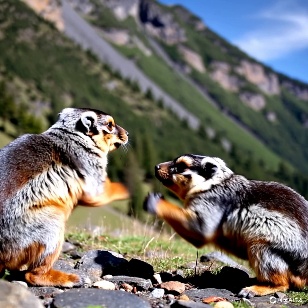
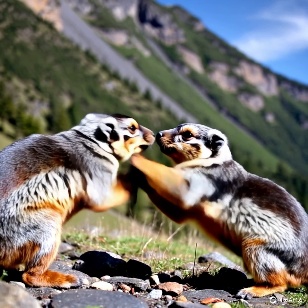
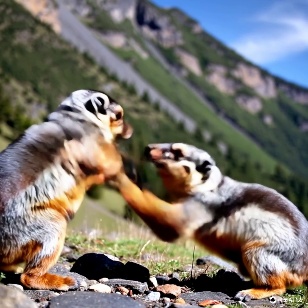
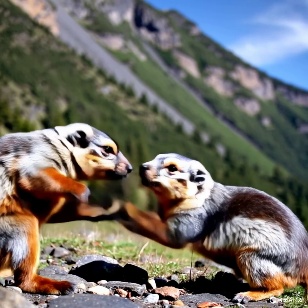
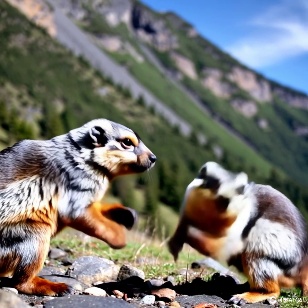
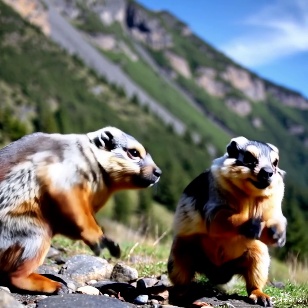
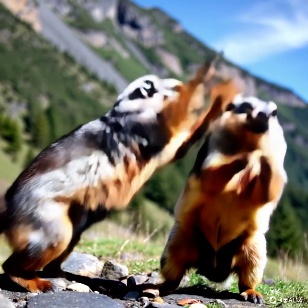
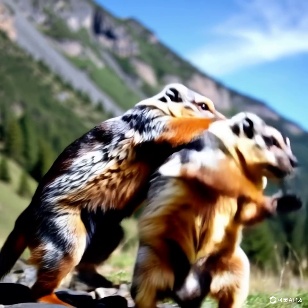
示例 1:输入
图片:video/frame_0000.jpg
问题:Describe this image in one sentence.
实际回复
Two animals are standing on a rocky terrain, with a mountainous landscape in the background.
图中可见两只动物、石地和山坡背景,主要可见内容与回答一致;未据此判断动物物种。
客户端首段文字:1.891 s;完整流式请求:4.014 s。首段指首个非空文字事件;两项均为主机 HTTP 墙钟,包含输入传输与处理,不含模型加载,不是纯 NPU 耗时。
示例 2:输入
图片:video/frame_0000.jpg
问题:How many animals are visible? Reply with only the number.
实际回复
2
实际回答为 2(原文含前导空格),与输入图中的两只动物一致。
客户端首段文字:2.464 s;完整流式请求:2.689 s。首段指首个非空文字事件;两项均为主机 HTTP 墙钟,包含输入传输与处理,不含模型加载,不是纯 NPU 耗时。
示例 3:输入
视频帧:video/(8 帧,按文件名排序)
问题:Describe the actions of the animals in these video frames in two sentences.
实际回复
Two animals are playing with each other in a rocky area.
抓住了两只动物在石地上互动的大意,但没有说明抬爪、接触等具体动作,也未遵循“两句话”的要求;“玩耍”不能视为行为学结论。
客户端首段文字:4.208 s;完整流式请求:5.265 s。首段指首个非空文字事件;两项均为主机 HTTP 墙钟,包含输入传输与处理,不含模型加载,不是纯 NPU 耗时。
示例 4:输入
视频帧:video/(8 帧,按文件名排序)
问题:请用两句中文描述这些视频帧中动物的动作。
实际回复
Two blue-furred animals playfully interact on a rocky terrain, with one animal in the foreground and the other in the background.
未遵循中文和两句话要求,实际回复仍为英文。“蓝色毛发”与画面不符,前后位置描述也未准确反映这段互动,质量未通过。
客户端首段文字:3.967 s;完整流式请求:7.315 s。首段指首个非空文字事件;两项均为主机 HTTP 墙钟,包含输入传输与处理,不含模型加载,不是纯 NPU 耗时。
示例 5:输入
图片:video/frame_0000.jpg
问题:Describe this image in one sentence.
实际回复
Two animals are standing on a rocky terrain, with a mountainous landscape in the background.
在视频问答后再次提交同一图片和问题,实际文字与第一次逐字一致。
客户端首段文字:1.913 s;完整流式请求:3.746 s。首段指首个非空文字事件;两项均为主机 HTTP 墙钟,包含输入传输与处理,不含模型加载,不是纯 NPU 耗时。
示例 6:输入
图片:axera_logo.png
问题:What word is written in this image?
实际回复
The word written in the image is "XC2A".
图中可见 AXera 和“爱芯元智”,回复 XC2A 与实际文字不符,本例文字识别未通过。
客户端首段文字:2.112 s;完整流式请求:3.793 s。首段指首个非空文字事件;两项均为主机 HTTP 墙钟,包含输入传输与处理,不含模型加载,不是纯 NPU 耗时。
使用时注意:
- 仅测试一段官方八帧片段、其中的第一帧及一张标志图;没有验证实时摄像头、视频音轨、长片段或并发。
- 中文视频问题仍返回英文,且含错误颜色;标志文字识别错误。基本运行通过不代表回答质量通过。
这些结果用于对照部署后的输出,未覆盖完整数据集精度或长期连续运行。
查看样例环境与运行耗时
环境:RK3576 + AX8850 16GB M.2。模型版本:cc9a5dcec93777403e14512b53c54ccb2b4add8c。
| 组件 | 版本或配置 |
|---|---|
| 主机 / 内核 | RK3576,约 4GB RAM,6.1.115-vendor-rk35xx |
| AXCL / 驱动 | V3.16.0_20260729180218 |
| 固件 / CMM | V3.16.0 / 15232 MiB |
| 运行时 | AX-LLM 8501c22b940f / AXCL / Linux aarch64 / GCC 13.3 |
| 模型与输入 | 30 层,576 维词向量,AX650 W8A16,512×512 编码器;单图 5 块、视频 8 帧 |
| 采样 | top_k=1、temperature=0,单次最多 96 token;每题独立输入 |
| 指标 | 实测值 | 计时或统计范围 |
|---|---|---|
| 首次加载至服务就绪 | 38.136 s | 包含词表、语言分片和视觉编码器加载,不计入下列请求。 |
| 请求 1 首段文字 / 完整回复 | 1.891 s / 4.014 s | 同主机 HTTP 客户端墙钟,包含输入处理、预填充和生成;首段为首个非空 content 事件,不是独立 NPU 时间。 |
| 请求 2 首段文字 / 完整回复 | 2.464 s / 2.689 s | 同主机 HTTP 客户端墙钟,包含输入处理、预填充和生成;首段为首个非空 content 事件,不是独立 NPU 时间。 |
| 请求 3 首段文字 / 完整回复 | 4.208 s / 5.265 s | 同主机 HTTP 客户端墙钟,包含输入处理、预填充和生成;首段为首个非空 content 事件,不是独立 NPU 时间。 |
| 请求 4 首段文字 / 完整回复 | 3.967 s / 7.315 s | 同主机 HTTP 客户端墙钟,包含输入处理、预填充和生成;首段为首个非空 content 事件,不是独立 NPU 时间。 |
| 请求 5 首段文字 / 完整回复 | 1.913 s / 3.746 s | 同主机 HTTP 客户端墙钟,包含输入处理、预填充和生成;首段为首个非空 content 事件,不是独立 NPU 时间。 |
| 请求 6 首段文字 / 完整回复 | 2.112 s / 3.793 s | 同主机 HTTP 客户端墙钟,包含输入处理、预填充和生成;首段为首个非空 content 事件,不是独立 NPU 时间。 |
适用范围:
- 未导出逐层张量,不作全张量有限性或逐层精度结论。
- 该测试使用 16GB 卡,尚未验证 8GB 卡的容量。
遇到加载、内存或后端错误时,按常见问题处理。需要更换输入或接入业务时,按检查输出与记录结果保留自己的结果。
查看文件用途与版本信息
| 文件 / 目录内路径 | 用途 |
|---|---|
gradio_demo.py | Python 程序 / 前后处理 |
openai_cli.py | Python 程序 / 前后处理 |
SmolVLM2-256M-Video-Instruct_Ax650-C128-P768-CTX1024/llama_p128_l0_together.axmodel | 编译模型;按目录区分芯片和规格 |
SmolVLM2-256M-Video-Instruct_Ax650-C128-P768-CTX1024/llama_p128_l10_together.axmodel | 编译模型;按目录区分芯片和规格 |
SmolVLM2-256M-Video-Instruct_Ax650-C128-P768-CTX1024/llama_p128_l11_together.axmodel | 编译模型;按目录区分芯片和规格 |
SmolVLM2-256M-Video-Instruct_Ax650-C128-P768-CTX1024/llama_p128_l12_together.axmodel | 编译模型;按目录区分芯片和规格 |
SmolVLM2-256M-Video-Instruct_Ax650-C128-P768-CTX1024/llama_p128_l13_together.axmodel | 编译模型;按目录区分芯片和规格 |
config.json | 运行配置 |
run_api_ax650.sh | 启动或构建脚本 |
run_ax650.sh | 启动或构建脚本 |
仓库提交:cc9a5dcec93777403e14512b53c54ccb2b4add8c。仓库中的 32 个 .axmodel 文件可能包括多个芯片、规格和分片。运行时使用本页指定的配套文件,完整列表见固定版本目录。
参考资料
- 常用术语:AXCL、CMM、分词器与推理指标。
- 固定版本文件表。
- 模型卡 / 使用说明。
- 主要程序入口:gradio_demo.py。
返回完整模型目录。